關於opencv的小作業存檔_風聞
xp12138-2019-10-06 22:18
以下是實現opencv兩個小例子的報告(本程序基於vs2017以及opencv4.0):
(1)調整圖像對比度和亮度
#include “opencv2/highgui.hpp”
#include"opencv2/imgcodecs.hpp"
#include <iostream>
// we’re NOT “using namespace std;” here, to avoid collisions between the beta variable and std::beta in c++17
using std::cin;
using std::cout;
using std::endl;
using namespace cv;
int main(int argc, char** argv)
{
CommandLineParser parser(argc, argv, “{@input | lena.jpg | input image}”);
Mat image = imread(samples::findFile(parser.get<String>("@input"))); //從opencv安裝路徑(D:\opencv\opencv\sources\samples\data)用findfile命令讀取sample下data文件夾目錄名字為lena.jpg的圖片,也可以imread(“絕對文件路徑”)例如imread(“C:/Users/Administrator/Desktop/name.jpg”)
if (image.empty())
{
cout << “Could not open or find the image!\n” << endl; //判斷讀取的圖形是否為空,為空則返回-1;即退出。
cout << “Usage: " << argv[0] << " <Input image>” << endl;
return -1;
}
Mat new_image = Mat::zeros(image.size(), image.type()); //定義新容器以存儲變更亮度的圖片
double alpha = 1.0; //定義對比度係數
int beta = 255; //定義灰度係數
cout << " 請輸入基本線性變換參數 " << endl;
cout << “-------------------------” << endl;
cout << “* 輸入alpha的值 [1.0-3.0]: “; cin >> alpha;
cout << “* 輸入beta的值 [0-100]: “; cin >> beta;
for (int y = 0; y < image.rows; y++) {
for (int x = 0; x < image.cols; x++) {
for (int c = 0; c < image.channels(); c++) {
new_image.at<Vec3b>(y, x)[c] =
saturate_cast<uchar>(alpha*image.at<Vec3b>(y, x)[c] + beta); //三個for循環依次對圖片的行,列,頻道像素進行變換,
} // saturate_cast<uchar>的作用是防止像素溢出,原理如下:
/* if (data < 0)
data = 0;
else if(data > 255)
data = 255; */
}
}
imshow(“Original Image”, image);
imshow(“New Image”, new_image); //顯示新舊對比圖像。
waitKey();
return 0;
}
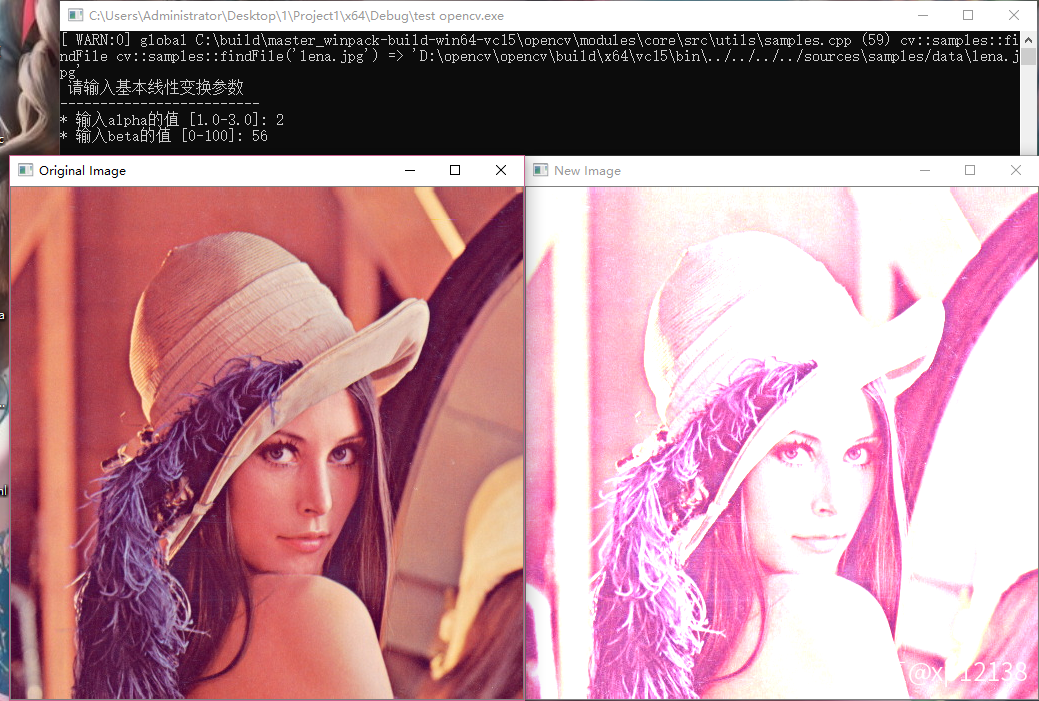
效果如下:
(2)把兩張圖片按權重混合為一(兩張圖片務必大小相等,長寬像素點相同) blend two image to one
#include “opencv2/imgcodecs.hpp”
#include “opencv2/highgui.hpp”
#include <iostream>
using namespace cv;
// we’re NOT “using namespace std;” here, to avoid collisions between the beta variable and std::beta in c++17
using std::cin;
using std::cout;
using std::endl;
int main(void)
{
double alpha = 0.5; double beta; double input; //定義參數
Mat src1, src2, dst; //定義三個存儲圖片的容器
cout << " Simple Linear Blender " << endl;
cout << “-----------------------” << endl;
cout << “* Enter alpha [0.0-1.0]: “;
cin >> input;
// We use the alpha provided by the user if it is between 0 and 1
if (input >= 0 && input <= 1)
{
alpha = input; //輸入權重
}
src1 = imread(samples::findFile(“LinuxLogo.jpg”)); //從sample/data目錄下加載linuxlogo.jpg文件
src2 = imread(samples::findFile(“WindowsLogo.jpg”));
if (src1.empty()) { cout << “Error loading src1” << endl; return EXIT_FAILURE; } //判斷兩者為空否
if (src2.empty()) { cout << “Error loading src2” << endl; return EXIT_FAILURE; }
beta = (1.0 - alpha);
addWeighted(src1, alpha, src2, beta, 0.0, dst); //調用addweighted函數對兩張圖片進行混合,addWeighted()函數是將兩張相同大小,相同類型的圖片融合的函數
/*API詳解:void cvAddWeighted( const CvArr* src1, double alpha,const CvArr* src2, double beta,double gamma, CvArr* dst );
參數1:src1,第一個原數組. 並且鋪在上層
參數2:alpha,第一個數組元素權重
參數3:src2第二個原數組
參數4:beta,第二個數組元素權重
參數5:gamma,圖1與圖2作和後添加的數值。不要太大,不然圖片一片白。總和等於255以上就是純白色了。
參數6:dst,輸出圖片*/
imshow(“windows”, src1);
imshow(“linux”, src2);
imshow(“Linear Blend”, dst); //輸出新圖片
waitKey(0);
return 0;
}
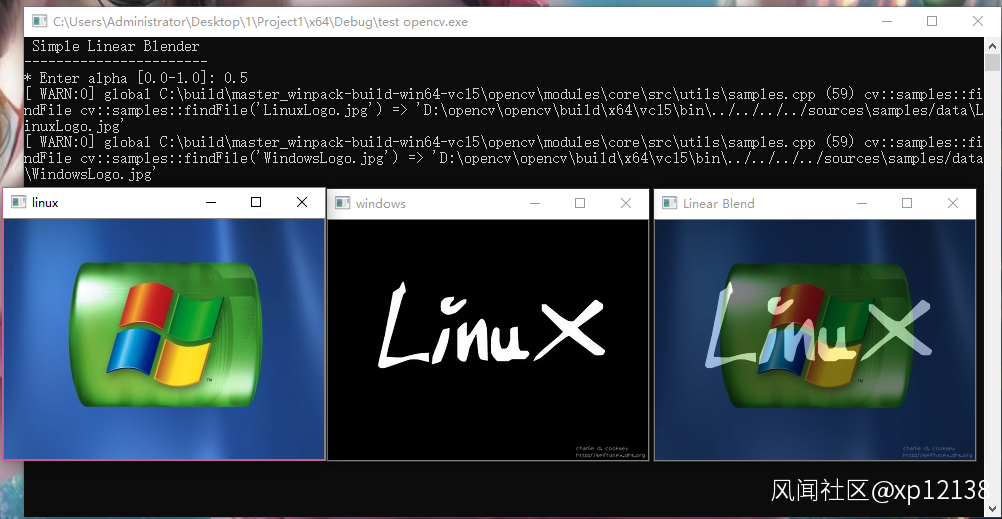
效果圖如下: