硬核浪漫!聖誕節給對象送禮的5個最沒用小技巧_風聞
毕导THU-毕导官方账号-2021-12-24 22:00
《聖誕節裏吃餃子》
臘月廿四平安夜,過了今晚過聖誕。
聖誕雖説是洋節,吃口餃子也和諧。
聖誕擀了餃子皮,福祿壽喜都到齊。
聖誕餃子蘸着醋,來年出門不迷路。
聖誕餃子不吃飽,大年三十沒棉襖。
不到長城非好漢,不吃餃子無聖誕。
無!!!聖!!!!誕!!!
(定場詩完)
今年的聖誕節恰逢週末,許多觀眾朋友結束了一週辛勤的學習和工作,正好藉此機會約上對象或者是正在追的對象出去玩耍。
小冷風一吹,小手手一牽,小禮物一送,小浪漫氣氛一起,事情就這麼成了
**但送什麼禮物、怎麼送禮物,是一門藝術!**在當今社會,人們對禮物早已不再滿足於物質層面的需求,而更追求精神層面的儀式感。
**你送個蘋果,**今晚吃完,過三天對方已經不記得你送過啥了。**你送束花,**現在的人都手笨,哪還會養花?**你送個幾萬塊的名錶名包,**對方會覺得你只是想用金錢收買自己,格局又小了(這一條我沒試過所以不太確定,但我猜應該是這樣)。
**在我看來,送禮最重要的是創意!**一個好的創意,既能展現你的特點,又能給對方留下深刻印象,是非常加分的。
考慮到我的粉絲羣體通常比較喜歡理工科的硬核浪漫。今天,畢老師就來給大家分享5個很適合在聖誕節送的禮物,絕對好用,不好用我論文送你二作。
一、用Python寫一張賀卡
Python是一門面向對象編程的語言,天然很適合用於面向你的對象送禮物。
我在這裏幫大家找到了一段用Python生成聖誕賀卡的程序,來自https://www.codetoday.co.uk/christmas。只要放到編譯器裏直接一run,就會出現一張非常温馨可愛的聖誕賀卡!相信我,沒有人能抵抗如此用心的設計。
話不多説我們直接上代碼!
# https://www.codetoday.co.uk/christmas
import turtle
import random
import time
width = 600
height = 500
window = turtle.Screen()
window.setup(width, height)
window.bgcolor(“sky blue”)
window.title(“Merry Christmas”)
snowball_rate = 1, 3
snowball_size = 5, 15
wind_change = 1, 5
max_wind = 3
# Create all circle-shaped objects
def make_circle(turtle_name, x, y, size, colour):
turtle_name.color(colour)
turtle_name.penup()
turtle_name.setposition(x, y)
turtle_name.dot(size)
# Create new snowballs and store in list
list_of_snowballs = []
def make_snowball():
snowball = turtle.Turtle()
snowball.color(“white”)
snowball.penup()
snowball.setposition(random.randint(-2*width, width/2), height/2)
snowball.hideturtle()
snowball.size = random.randint(*snowball_size)
list_of_snowballs.append(snowball)
def move_snowball(turtle_name, falling_speed=1, wind=0):
turtle_name.clear()
turtle_name.sety(turtle_name.ycor() - falling_speed)
if wind:
turtle_name.setx(turtle_name.xcor() + wind)
turtle_name.dot(turtle_name.size)
# Snowman: body
snowman = turtle.Turtle()
x_position = 0
y_positions = 75, 0, -100
size = 75
for y in y_positions:
make_circle(snowman, x_position, y, size, “white”)
size = size * 1.5
# Snowman: buttons
button_seperation = 25
button_y_positions = [y_positions[1]-button_seperation,
y_positions[1],
y_positions[1]+button_seperation]
for y in button_y_positions:
make_circle(snowman, x_position, y, 10, “black”)
# Snowman: eyes
y_offset = 10
x_seperation = 15
for x in x_position-x_seperation, x_position+x_seperation:
make_circle(snowman, x, y_positions[0] + y_offset, 20, “green”)
make_circle(snowman, x, y_positions[0] + y_offset, 10, “black”)
# Snowman: nose
snowman.color(“orange”)
snowman.setposition(x_position - 10, y_positions[0]-y_offset)
snowman.shape(“triangle”)
snowman.setheading(200)
snowman.turtlesize(0.5, 2.5)
window.tracer(0)
# Ground
grass = turtle.Turtle()
grass.fillcolor(“forest green”)
grass.penup()
grass.setposition(-width/2, -height/2)
grass.begin_fill()
for _ in range(2):
grass.forward(width)
grass.left(90)
grass.forward(70)
grass.left(90)
grass.end_fill()
ground = turtle.Turtle()
for x in range(int(-width/2), int(width/2), int(width/200)):
make_circle(ground, x, -180, random.randint(5, 20), “white”)
text = turtle.Turtle()
text.color(“red”)
text.penup()
text.setposition(-100, 170)
text.write(“Merry Christmas”, font=(
“Apple Chancery”, 30, “bold”), align=“center”)
text.setposition(130, 140)
text.color(“dark green”)
text.write(“Dao”, font=(“Avenir”, 30, “bold”), align=“right”)
text.color(“black”)
text.write(“Bi”, font=(“Avenir”, 30, “normal”), align=“left”)
text.setx(50)
text.write(“from”, font=(“Apple Chancery”, 20, “bold”), align=“right”)
text.hideturtle()
time_delay = 0
start_time = time.time()
wind = 0
wind_delay = 5
wind_timer = time.time()
wind_step = 0.1
while True:
if time.time() - start_time > time_delay:
make_snowball()
start_time = time.time()
time_delay = random.randint(*snowball_rate)/10
for snowball in list_of_snowballs:
move_snowball(snowball, wind=wind)
if snowball.ycor() < -height/2:
snowball.clear()
list_of_snowballs.remove(snowball)
if time.time() - wind_timer > wind_delay:
wind += wind_step
if wind >= max_wind:
wind_step = -wind_step
elif wind <= 0:
wind_step = abs(wind_step)
wind_timer = time.time()
wind_delay = random.randint(*wind_change)/10
window.update()
turtle.done()
運行後是這樣的,會跳出一個動畫卡片:
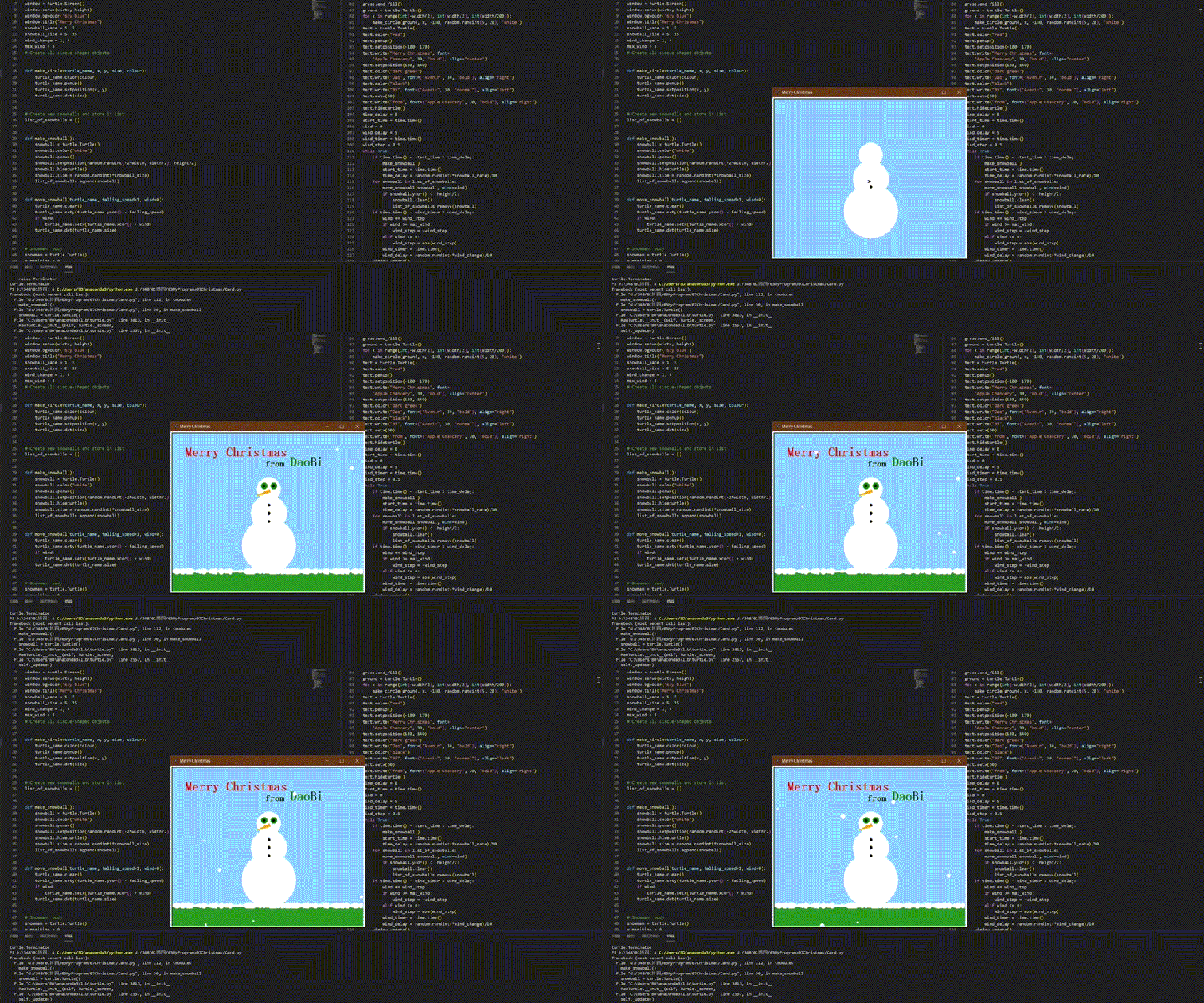
看啊!雪人栩栩如生,瞪着萌萌的大眼睛 雪花片片飄落,恰如此刻的美景
 看到這種浪漫的意境不感動的,那還是人?
請大家在評論區告訴我,看到這張圖,你,哭了嗎?
二、用turtle畫一個餃子
當然,有些同學可能會説,我們不過洋節!那沒關係,我們在聖誕節吃個餃子,不就中學為體西學為用了麼
下面我們用Python的turtle庫為大家畫個餃子,直接上代碼!
import turtle
turtle.setup(600,400)
turtle.penup()
turtle.goto(-180,-80)
turtle.pendown()
turtle.pensize(5)
turtle.pencolor(‘black’)
turtle.seth(-20)
turtle.circle(500,40)
turtle.seth(110)
turtle.circle(182,140)
turtle.seth(150)
for i in range(4):
turtle.circle(-35,143)
turtle.circle(19,110)
turtle.circle(-35,135)
turtle.left(5)
turtle.circle(19,100)
turtle.circle(-26.5,150)
turtle.penup()
turtle.goto(-149,-9)
turtle.pendown()
turtle.seth(-40)
turtle.fd(5)
turtle.penup()
turtle.goto(-83,52)
turtle.pendown()
turtle.seth(-67)
turtle.fd(20)
turtle.penup()
turtle.goto(2,70)
turtle.pendown()
turtle.seth(-97)
turtle.fd(24)
turtle.penup()
turtle.goto(83,42)
turtle.pendown()
turtle.seth(-120)
turtle.fd(15)
turtle.penup()
turtle.goto(145,-24)
turtle.pendown()
turtle.seth(-155)
turtle.fd(5)
turtle.penup()
turtle.pensize(12)
turtle.goto(-45,-20)
turtle.pendown()
turtle.dot()
turtle.penup()
turtle.goto(40,-20)
turtle.pendown()
turtle.dot()
turtle.penup()
turtle.pensize(5)
turtle.goto(-25,-50)
turtle.seth(5)
turtle.pendown()
turtle.fd(47)
turtle.penup()
turtle.goto(-25,-50)
turtle.seth(-85)
turtle.pendown()
turtle.circle(25,175)
turtle.penup()
turtle.pensize(20)
turtle.pencolor(‘pink’)
turtle.goto(-60,-50)
turtle.pendown()
turtle.dot()
turtle.penup()
turtle.goto(58,-49)
turtle.pendown()
turtle.dot()
turtle.penup()
turtle.goto(-200,300)
turtle.done()
畫出來是這樣的
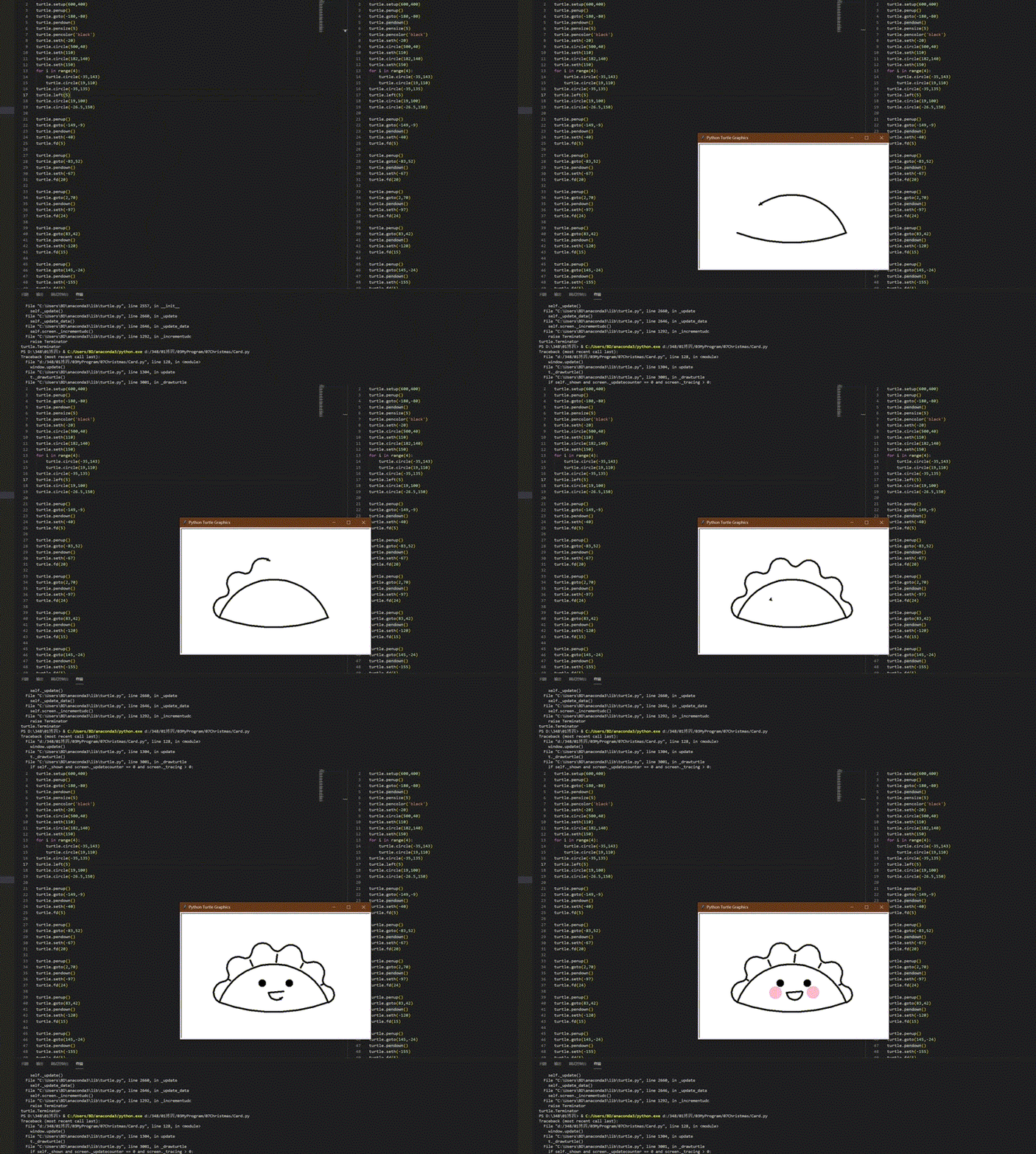
小小的turtle,飄若浮雲,矯若驚龍 而最後的粉粉臉頰更是點睛之筆
 收到這個餃子程序但沒有愛上你的,那還是人?
特別要提醒的是,大家在給對象送上面的賀卡和餃子時,一定要直接把.py文件發過去!
這樣如果對方因為python環境、版本問題無法運行甚至壓根電腦裏沒裝python的話,你****就可以再去TA家裏幫着調試代碼,進一步增加了雙方接觸的機會,還能展現你強大的碼力。
千萬不要貼心地把賀卡和餃子給對方用pyinstaller打包成exe可執行文件,一來不夠酷炫,二來萬一你對象用的是linux系統,就打不開exe,你的心血就白費了
三、用Matlab畫一棵聖誕樹
眾所周知,Matlab除了生孩子,啥都能幹。這是一篇Matlab畫聖誕樹教程,非常美觀大方,推薦給大家https://blog.csdn.net/liu08_13/article/details/111609822。
代碼如下
close all;clear;clc
% setup
snow=450; % number of snow flakes [0 .. 5000]
% draw tree
h=0:0.2:25; %vertical grid
[X,Y,Z] = cylinder(tree(h)); %produce a tree formed cylinder
Z=Z*25; %scale to the right heigth
%Add some diffusion to the surface of the tree to make it look more real
treeDiffusion=rand(126,21)-0.5;%some horizontal diffusion data
%add diffusion to the grid points
for cnt1=1:21
for cnt2=16:126%starting above the trunk
%get the angle to always diffuse in direction of the radius
angle=atan(Y(cnt2,cnt1)/X(cnt2,cnt1));
%split the diffusion in the two coordinates, depending on the angle
X(cnt2,cnt1)=X(cnt2,cnt1)+cos(angle)*treeDiffusion(cnt2,cnt1);
Y(cnt2,cnt1)=Y(cnt2,cnt1)+sin(angle)*treeDiffusion(cnt2,cnt1);
%some Vertical diffusion for each point
Z(cnt2,cnt1)=Z(cnt2,cnt1)+(rand-0.5)*0.5;
end
end
%draw the tree
h0 = figure(‘Units’,‘inches’);
pos = h0.Position;
pos(1) = 1; pos(2) = 1;
pos(3) = 7; pos(4) = 7;
h0.Position = pos;
surfl(X,Y,Z,’light’)
%% View and format
%Use as nice green color map (darker at the bottom, lighter at the top)
r=(0.0430:(0.2061/50):0.2491)’;%red component
g=(0.2969:(0.4012/50):0.6981)’;%green component
b=(0.0625:(0.2696/50):0.3321)’;%blue component
map=[r,g,b];%join in a map
for cnt=1:6
%change the lower part to brown for the trunk
map(cnt,:)=[77,63,5]/265;
end
colormap(map)%set the map
view([-37.5,4])%Change the view to see a little more of the Actual 3D tree
lighting phong %some nice lighting
shading interp %remove grid and smoothen the surface color
axis equal %takes care of display in the right proportion
axis([-10 10 -10 10 0 30]) %give some more axis space (for the snow later)
axis off %but don’t show axis
hold on %to draw the rest
title(‘Merry Christmas’,‘color’,‘w’,…
‘fontsize’,25,…
‘fontweight’,‘Bold’)%self explaining
set(gcf,‘color’,[22 32 51]./255)
% Presents
%Draw some presents around the tree (each with random color)
drawPresent(2,-4,0,3,3,2);
drawPresent(-4,3,0,2,3,1.5);
drawPresent(5,3,0,4,3,3);
drawPresent(-14,-5,0,6,3,1);
drawPresent(-9,-10,0,2,2,2);
drawPresent(0,4,0,4,3,3);
drawPresent(-6,-13,0,3,3,3);
%% Snow
%create some random 3D coordinates for the snow (amount as in setup above)
snowX=(rand(snow-100,1)*25-12.5);
snowY=(rand(snow-100,1)*25-12.5);
snowZ=(rand(snow-100,1)*27);
color0 = jet(length(snowX));
%Note:Some flakes will end up IN the tree but just can’t be seen then
for ii = 1:length(snowX)
plot3(snowX(ii),snowY(ii),snowZ(ii),’*’,‘color’,color0(ii, :),‘markersize’,randi(15))%plot coordinates as white snow flakes
% plot3(snowX(ii),snowY(ii),snowZ(ii),’*’,‘color’,color0(ii, :))%plot coordinates as white snow flakes
end
h=plot3(snowX,snowY,snowZ,‘w*’);
im = {};
for ii = 1:180
if mod(ii,3) == 0
h.Visible = ‘off’;
snowX=(rand(snow,1)*25-12.5);
snowY=(rand(snow,1)*25-12.5);
snowZ=(rand(snow,1)*27);
h=plot3(snowX,snowY,snowZ,‘w*’);
% pause(0.25)
else
view([ii,4])
% pause(0.1)
end
if ii > 85
frame = getframe(gcf);
im{ii} = frame2im(frame);
end
end
hold off%Done
im(cellfun(@isempty,im))=[];
% end % of function
file2write = ‘chris.gif’;
for ii = 1:length(im)
[A, map] = rgb2ind( im{ii}, 256);
if ii == 1
imwrite(A, map, file2write, ‘gif’,‘LoopCount’,Inf,‘DelayTime’, 0.12);
else
imwrite(A, map, file2write, ‘gif’,‘WriteMode’,‘append’,‘DelayTime’, 0.12);
end
end
%% ============= private functions
function r=tree(h)%Gives a profile for the tree
for cnt=1:length(h)
if(h(cnt)==0)%no Width at the bottom. Ensures a “closed” trunk
r(cnt)=0;
end
%smaller radius for the trunk
if (h(cnt)>0 && h(cnt)<=3)
r(cnt)=1.5;
end
%reduce radius gradually from 8 to 0. Note: will only work with a trunk heigth
%of 3 and a whole tree heigth of 25. Scale the height of the tree in
%the “draw tree” section, since the cylinder command will return a 1
%unit high cylinder anyway
if(h(cnt)>3)
r(cnt)=8-(h(cnt)-3)*0.3636;
end
end
end % of function
%Draws a present with the given coordinate + size in a random color
%Note:Given coordinates apply to the lower front + left corner of the
%present (the one closest to the viewer) as seen in the plot
function drawPresent(dx,dy,dz,scalex,scaley,scalez)
%the standard present coordinates
presentX=[0.5 0.5 0.5 0.5 0.5; 0 1 1 0 0; 0 1 1 0 0; 0 1 1 0 0; 0.5 0.5 0.5 0.5 0.5];
presentY=[0.5 0.5 0.5 0.5 0.5; 0 0 1 1 0; 0 0 1 1 0; 0 0 1 1 0; 0.5 0.5 0.5 0.5 0.5];
presentZ=[0 0 0 0 0; 0 0 0 0 0; 0.5 0.5 0.5 0.5 0.5; 1 1 1 1 1; 1 1 1 1 1];
%draw some presents with random colors
%scale present and move it to the right place and get the plot handle
myHandle=surf((presentX*scalex+dx),(presentY*scaley+dy), (presentZ*scalez+dz));
%some random color map
randColorMap(:,:,1)=repmat(rand,[5,5]);%r component
randColorMap(:,:,2)=repmat(rand,[5,5]);%g component
randColorMap(:,:,3)=repmat(rand,[5,5]);%b component
%Assign colormap just to the plot handle object of the present, so the tree
%does not change color
set(myHandle,‘CData’,randColorMap)
shading interp %Nice shding + without grid
end % of function
出來的效果也是很閃耀的!喜歡一棵樹的眼神是藏不住的
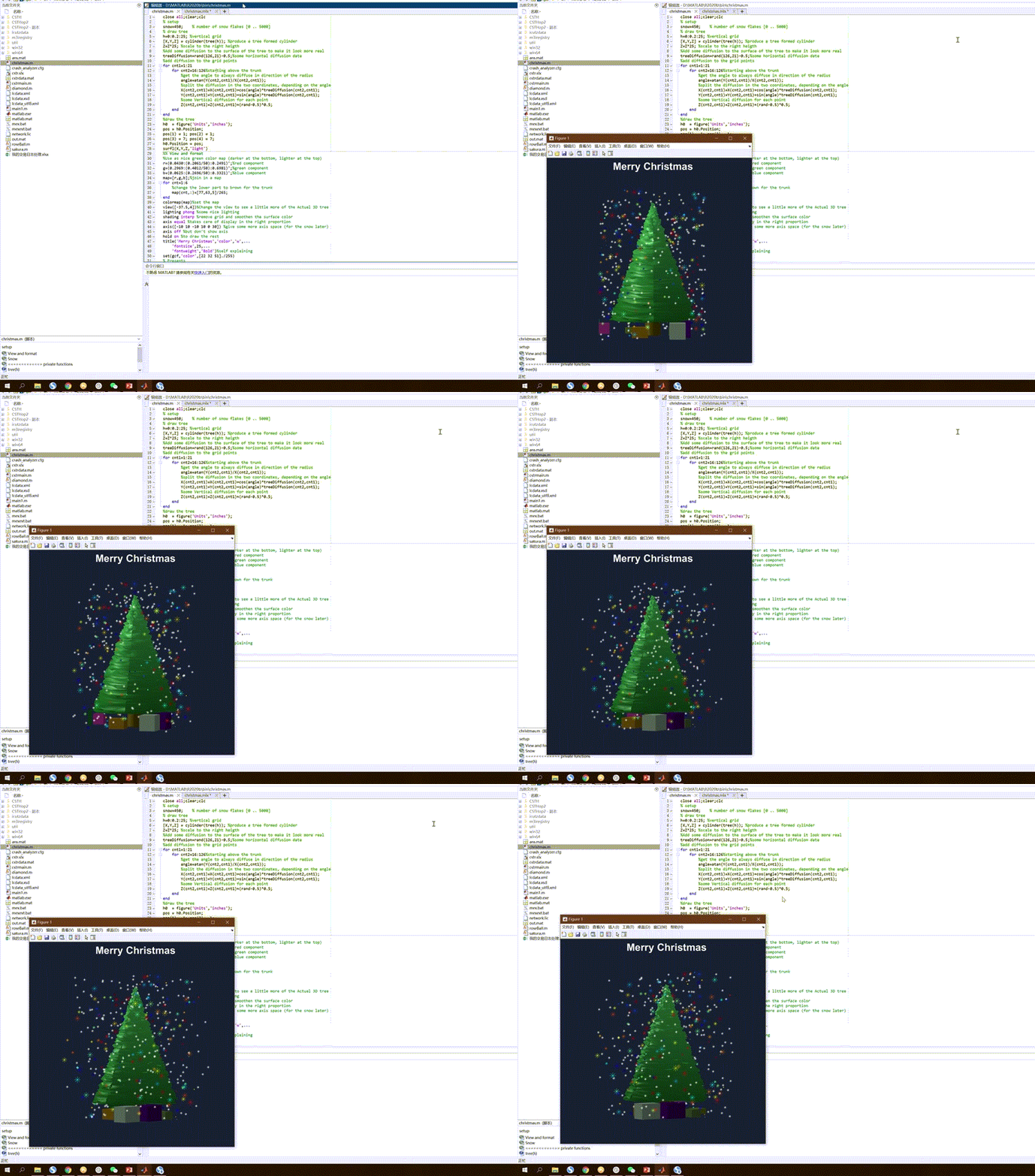
如果你對象沒有Matlab,那你正好去TA家給裝一個。Matlab安裝包十幾個G,安裝的時候夠你們玩點有的沒的東西了
四、用Matlab徹底征服對方!
人一旦開始用Matlab做數學計算以外的東西,就很容易墮入它的黑暗面。網上的各種玩法會讓Matlab公司覺得15500元賣你這個軟件都虧了。
參照這篇教程https://blog.csdn.net/slandarer/article/details/119521516,你很容易實現用Matlab畫大玫瑰、大鑽石、大相冊。
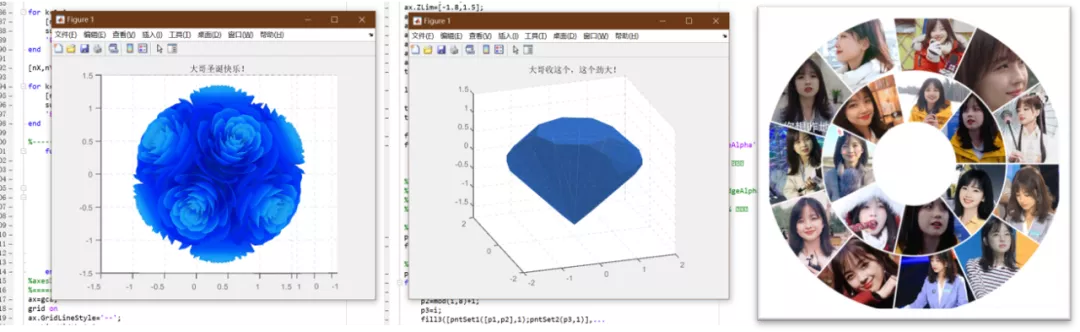
可以説是造型精美,算法巧妙。推薦大家一定要試試,試完了一定要把你對象的回覆截圖發給我。
五、用AI給對方畫幾幅畫
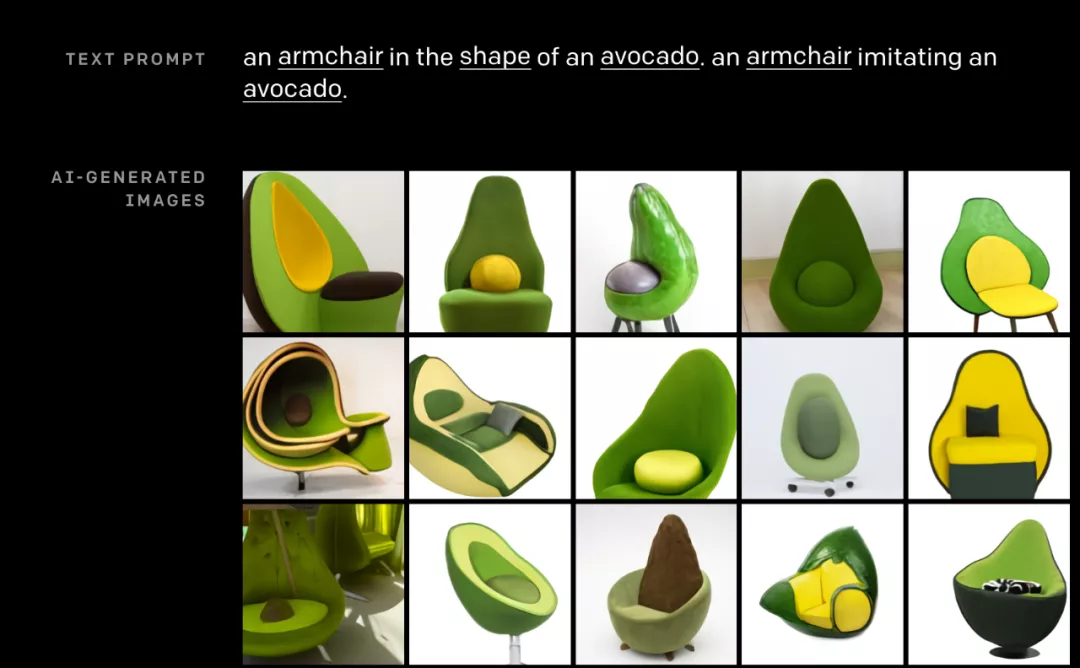
近年來隨着人工智能的發展,AI已經可以根據詞語來畫畫。比如著名的模型GPT-3,你給它輸入一個詞語,它就會自動按這個詞語創造圖片!像你輸入**“牛油果椅子”**,它就會自己原創出下面這些圖片,非常Amazing!
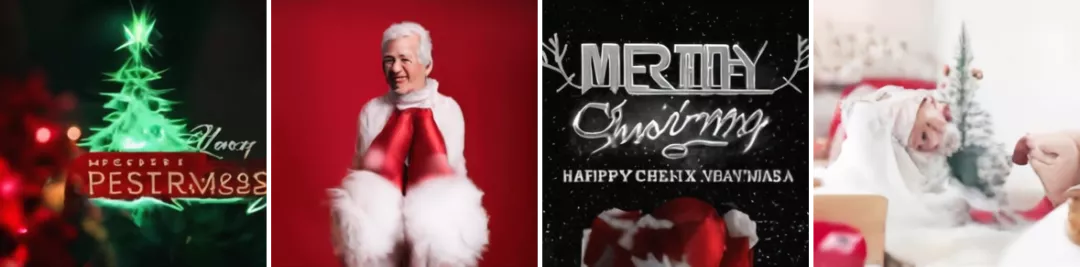
清華之前也做過一個類似的叫Cogview。比如我們輸入“聖誕節快樂”,AI就會自動創作出一些很貼切的圖片。

網址在此:https://wudao.aminer.cn/CogView/index.html
我們放大看看,世界上最先進的AI模型是否給你的聖誕節增添了一絲節日的氛圍呢
好的,小技巧就給大家介紹這麼多,你學廢了嗎?拿好這篇教程去給你的對象送禮吧!好用的話,記得帶點水果,來醫院看我。